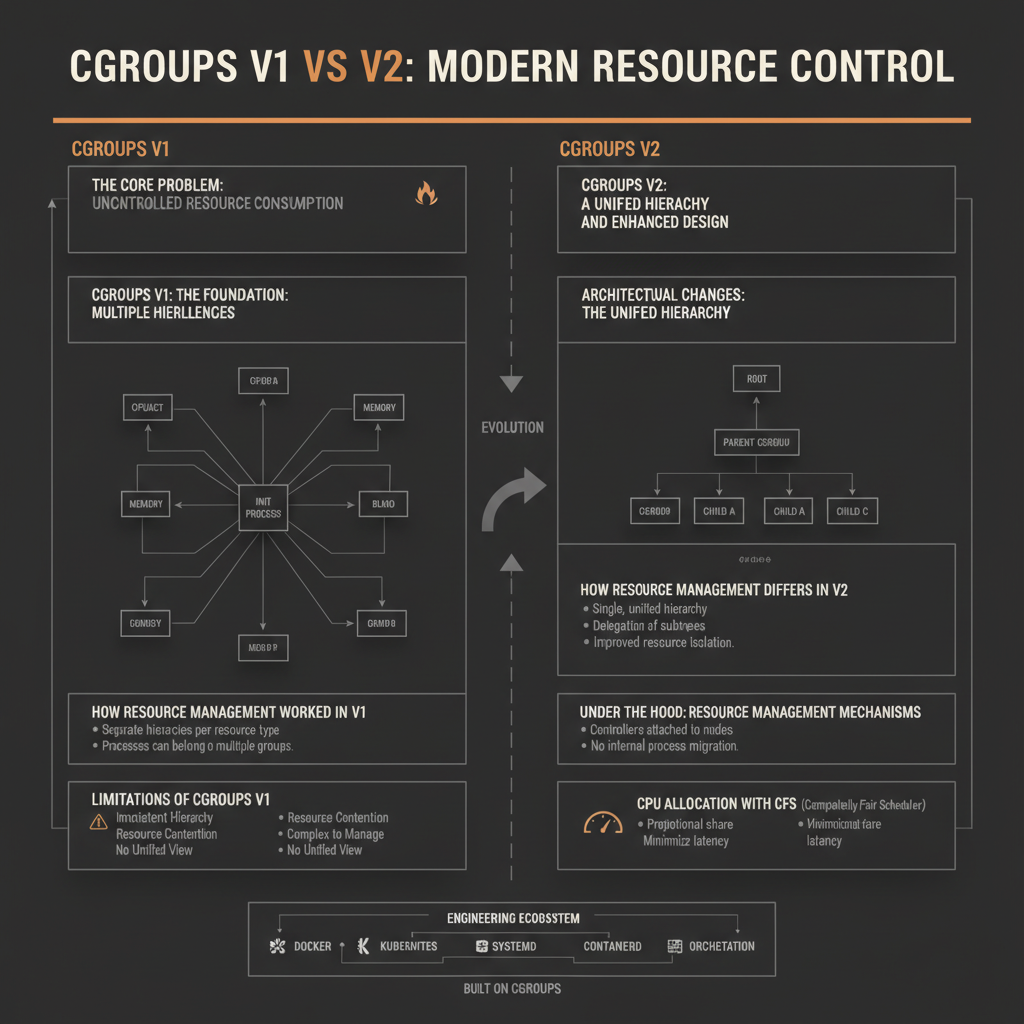
The smooth operation of modern cloud infrastructure, from simple Docker containers to complex Kubernetes clusters, hinges on a fundamental Linux kernel feature: Control Groups, or cgroups. Without cgroups, a single runaway process could starve an entire system of CPU, memory, or I/O, leading to instability and service outages. Understanding the evolution from cgroups v1 to cgroups v2 is crucial for anyone managing containerized workloads, as it represents a significant architectural shift with profound implications for resource predictability, isolation, and overall system performance.
The Core Problem: Uncontrolled Resource Consumption
Imagine a server running multiple applications, perhaps a web server, a database, and a batch processing job. If the batch job suddenly starts consuming 100% of the CPU or exhausts all available memory, the web server and database performance will degrade drastically, potentially becoming unresponsive. This lack of resource isolation is a critical problem in multi-tenant environments or even on a single server running diverse workloads.
Cgroups were designed to solve this by providing a mechanism to:
- Isolate: Prevent one group of processes from consuming all system resources.
- Prioritize: Allocate more resources to critical workloads.
- Monitor: Track resource usage for accountability and scaling.
- Control: Limit resource usage to specified thresholds.
At its heart, a cgroup is a collection of processes that are bound together by a set of resource limits and parameters. The Linux kernel provides various “controllers” (e.g., CPU, memory, I/O) that enforce these limits on processes within a cgroup.
Cgroups v1: The Foundation and Its Challenges
Cgroups v1, introduced in Linux kernel 2.6.24, laid the groundwork for resource management. It allowed administrators to organize processes into hierarchical groups and apply resource constraints.
Internal Architecture: Multiple Hierarchies
The defining characteristic of cgroups v1 is its multiple independent hierarchies. Each resource controller (like cpu, memory, blkio, pids) could be mounted as a separate hierarchy in the /sys/fs/cgroup filesystem.
- Hierarchies: Each hierarchy is a tree structure where child cgroups inherit properties from their parents. A process can belong to different cgroups in different hierarchies. For example, a process could be in
/sys/fs/cgroup/cpu/myappfor CPU limits and/sys/fs/cgroup/memory/myotherappfor memory limits. - Controllers: Specific kernel modules that enforce resource limits. When a hierarchy is mounted, specific controllers can be attached to it (e.g.,
mount -t cgroup -o cpu,memory cgroup /sys/fs/cgroup/unified). - Tasks: Processes are added to cgroups by writing their Process ID (PID) to the
tasksfile within a cgroup directory.
How Resource Management Worked in v1
Let’s look at CPU and Memory controllers:
- CPU Controller (
cpu,cpuacct):cpu.shares: A relative weighting. IfcgroupAhas 1024 shares andcgroupBhas 512, and there’s CPU contention,cgroupAgets roughly twice the CPU ascgroupB. This is only active during contention.cpu.cfs_period_usandcpu.cfs_quota_us: These provide hard CPU limits.cfs_quota_usspecifies the total CPU time (in microseconds) that a cgroup can get in everycfs_period_us(also in microseconds). For example,quota=50000,period=100000means 50% of one CPU core.
- Memory Controller (
memory):memory.limit_in_bytes: The hard limit for memory usage (including page cache).memory.swappiness: Controls how aggressively the kernel swaps out anonymous pages versus file-backed pages.memory.usage_in_bytes: Current memory usage.- When a cgroup exceeds its memory limit, the kernel’s Out-Of-Memory (OOM) killer is invoked to terminate processes within that cgroup.
Limitations of Cgroups v1
Despite its utility, cgroups v1 presented several challenges:
- Multiple Hierarchies: This led to complexity and potential inconsistencies. A process could be in different cgroups for different resources, making it hard to reason about its overall resource profile. This was particularly problematic for resource models that logically span multiple controllers (e.g., “this application gets X CPU and Y memory”).
- Resource Contention: Some controllers (like
blkio) were difficult to implement effectively across multiple hierarchies. - Ambiguous Delegation: Delegating a subset of resources to a sub-system (like a container runtime) was tricky. Child cgroups could sometimes escape parent limits or behave unexpectedly.
- Inconsistent Memory Accounting: The memory controller’s accounting could be tricky, especially with shared memory and page cache, leading to discrepancies between reported usage and actual limits.
- No Unified I/O Controller: The
blkiocontroller only managed block device I/O, not network I/O, and had its own set of complexities.
Cgroups v2: A Unified Hierarchy and Enhanced Design
Cgroups v2, standardized in Linux kernel 4.5, was designed to address the fundamental limitations of v1 by introducing a simpler, more robust, and unified resource management model.
Architectural Changes: The Unified Hierarchy
The most significant change in cgroups v2 is the single unified hierarchy. All controllers are mounted under a single cgroup filesystem, typically at /sys/fs/cgroup. This means a process belongs to exactly one cgroup in this unified tree, and that cgroup defines all its resource constraints.
Key architectural improvements in v2:
- Single Root: There’s only one cgroup hierarchy. All processes are part of this tree.
- Explicit Delegation: Controllers are enabled or disabled for a cgroup. A parent cgroup explicitly “delegates” controllers to its children. This means if a controller (e.g.,
cpu) is enabled on a parent, it must be enabled on all its children. This prevents a child from escaping parent limits. - No Internal Processes in Parent Nodes: A cgroup that has children cannot directly contain processes. Instead, processes must reside in “leaf” cgroups (those without children). This simplifies resource distribution.
- New Controllers: A unified
iocontroller replacesblkio, and it’s designed to be more comprehensive and efficient. - Improved Memory Accounting: More accurate and consistent memory accounting, including better handling of the page cache.
How Resource Management Differs in v2
- CPU Controller (
cpu):cpu.weight: Replacescpu.shares(range 1-10000, default 100). Similar relative weighting.cpu.max: Replacescpu.cfs_quota_usandcpu.cfs_period_us. It’s a single valuemax_time period_time.max_timeis the total CPU time available inperiod_time. For example,50000 100000means 50% of one CPU.max_timecan bemaxfor unlimited.
- Memory Controller (
memory):memory.max: The hard limit for memory usage.memory.high: A soft limit, triggering throttling beforememory.maxis hit, allowing the kernel to proactively reclaim memory.memory.min: A minimum amount of memory that will be protected from reclaim.- Memory accounting is more coherent, making it easier to see how much memory a group is actually using.
- I/O Controller (
io):- Provides more granular control over I/O bandwidth and operations per second (IOPS) for block devices.
io.max: Sets maximum read/write bandwidth and IOPS for specific devices.
Under the Hood: Resource Management Mechanisms
Both cgroups v1 and v2 leverage various kernel mechanisms to enforce resource limits.
CPU Allocation with CFS
The Linux kernel’s Completely Fair Scheduler (CFS) is at the heart of CPU resource management. When CPU controllers are active, CFS uses parameters from cgroups to decide which process runs next.
- Shares/Weight: When multiple cgroups contend for CPU, CFS distributes time proportionally to their
cpu.shares(v1) orcpu.weight(v2). A higher value means more CPU time during contention. - Quota/Max:
cpu.cfs_quota_us/cpu.cfs_period_us(v1) orcpu.max(v2) provides a hard cap. CFS ensures that a cgroup’s total runtime within aperioddoes not exceed itsquota/max_time. If a cgroup hits its quota, its processes are throttled until the next period.
Memory Management and OOM
The memory controller interacts deeply with the kernel’s memory management unit.
- Page Cache Accounting: Both versions track anonymous pages (heap, stack) and file-backed pages (memory-mapped files, page cache). V2 offers more consistent accounting, especially for shared pages.
- OOM Killer: When a cgroup’s memory usage reaches
memory.limit_in_bytes(v1) ormemory.max(v2), the kernel’s OOM killer is invoked. It selects a process (usually the largest memory consumer) within that cgroup to terminate, freeing up memory. V2’smemory.highprovides a better mechanism to avoid OOM by triggering proactive memory reclaim before the hard limit is hit. - Swap: Cgroups can also limit swap space usage.
I/O Control
- v1
blkio: Managed I/O through “weights” (blkio.weight) and “limits” (blkio.throttle.read_bps_device). It was device-specific and sometimes difficult to configure for complex scenarios. - v2
io: The unifiediocontroller is more integrated and provides a cleaner interface. It usesio.maxto specify maximum read/write bytes per second (BPS) or I/O operations per second (IOPS) for specific block devices. This controller is designed to work better with the unified hierarchy and provides more consistent behavior.
Cgroups in Action: A Containerized Example
Let’s illustrate how cgroups are typically used to constrain a process. Modern systems often use systemd to manage cgroups, abstracting away direct cgroupfs manipulation. However, we’ll show both for clarity.
Identifying Your Cgroup Version
First, check which cgroup version your system uses:
stat -f -c %T /sys/fs/cgroup/- If it returns
cgroupfs, you are likely on v1 (or a hybrid). - If it returns
cgroup2fs, you are on v2.
Most modern Linux distributions (e.g., Ubuntu 20.04+, Fedora 31+, RHEL 8+) default to cgroups v2.
Mini-Project: Limiting a CPU-Bound Process
We’ll create a simple C program that spins in an infinite loop to simulate a CPU-bound process.
// cpu_hog.c
#include <stdio.h>

int main() {
    printf("CPU hog started. PID: %d\n", getpid());
    while (1) {
        // Spin to consume CPU
    }
    return 0;
}
Compile it:
gcc cpu_hog.c -o cpu_hogScenario 1: Cgroups v1 (Manual Setup)
If your system is v1, you might use cgcreate and cgexec (part of cgroup-tools).
- Create a cgroup:
sudo cgcreate -g cpu,memory:mycgroup_v1
This creates a cgroup named `mycgroup_v1` in both the `cpu` and `memory` hierarchies. You'll find directories like `/sys/fs/cgroup/cpu/mycgroup_v1` and `/sys/fs/cgroup/memory/mycgroup_v1`.
- Set CPU limit (50% of one core):
    # Set period to 100ms (100000 us)
    sudo sh -c "echo 100000 > /sys/fs/cgroup/cpu/mycgroup_v1/cpu.cfs_period_us"
    # Set quota to 50ms (50000 us) per period
    sudo sh -c "echo 50000 > /sys/fs/cgroup/cpu/mycgroup_v1/cpu.cfs_quota_us"
- Execute the process within the cgroup:
sudo cgexec -g cpu,memory:mycgroup_v1 ./cpu_hog
Now, if you monitor `top` or `htop`, you'll see `cpu_hog` consuming approximately 50% of one CPU core, even if more is available.
Scenario 2: Cgroups v2 (Manual Setup)
For v2, we interact directly with the unified cgroupfs.
- Create a cgroup directory:
sudo mkdir /sys/fs/cgroup/mycgroup_v2
- Enable controllers for the cgroup:
By default, controllers are inherited. To enable
cpuformycgroup_v2, the parent (root cgroup) must delegate it.systemdtypically manages this. If you are manually doing this, you’d need to write tocgroup.subtree_controlin the parent. For simplicity, assumecpuis available.
    # Enable CPU controller for this cgroup (if not already delegated by parent)
    # This assumes the parent allows delegation.
    sudo sh -c "echo '+cpu' > /sys/fs/cgroup/mycgroup_v2/cgroup.subtree_control"
*Note: In a `systemd`-managed system, you'd typically define a `.slice` or `.service` file to handle this, and `systemd` would manage the `cgroup.subtree_control` files.*
- Set CPU limit (50% of one core):
    # Format: max_time period_time
    sudo sh -c "echo '50000 100000' > /sys/fs/cgroup/mycgroup_v2/cpu.max"
- Move the process into the cgroup:
Start the
cpu_hogin a separate terminal:
./cpu_hog
Get its PID, then move it:
    PID=$(pgrep cpu_hog)
    sudo sh -c "echo $PID > /sys/fs/cgroup/mycgroup_v2/cgroup.procs"
Again, `cpu_hog` will be limited to 50% CPU.
This example demonstrates the fundamental interaction: creating a cgroup, setting parameters, and assigning processes. In real-world container runtimes, this is abstracted away, but the underlying mechanisms are the same.
Why Cgroups v2 is a Game Changer for Kubernetes
Kubernetes relies heavily on cgroups to manage the resources of pods and containers. The transition from v1 to v2 brings significant benefits:
Simplified Resource Model: The unified hierarchy of v2 aligns better with Kubernetes’s hierarchical structure (Node -> Pod -> Container). This reduces the complexity for container runtimes (like containerd and CRI-O) and
kubeletin managing cgroups.- Less Code: Runtimes need less code to manage cgroups, as they don’t have to deal with multiple hierarchies and potential synchronization issues.
- Predictable Behavior: The explicit delegation model ensures that resource limits set at the Pod level are correctly inherited and enforced by containers within that Pod.
Improved Memory Accounting and OOM Handling:
- Accurate Usage: V2 provides more accurate memory usage statistics, which helps
kubeletmake better scheduling decisions and report more reliable metrics. - Proactive Reclamation: The
memory.highsoft limit allows the kernel to start reclaiming memory proactively before a hard limit (memory.max) is hit. This reduces the likelihood of sudden OOM kills, leading to more stable applications. - Unified Page Cache: V2’s memory controller more consistently accounts for page cache, which was a source of confusion and discrepancies in v1.
- Accurate Usage: V2 provides more accurate memory usage statistics, which helps
Enhanced I/O Isolation: The new
iocontroller in v2 offers more robust and granular control over disk I/O. This is critical for applications that are I/O bound, preventing noisy neighbors from hogging disk resources.- Fairer Distribution: It allows for fairer distribution of I/O bandwidth and IOPS, which is essential in multi-tenant storage environments.
Reduced Controller Conflicts: In v1, different controllers could sometimes have conflicting views or interactions, leading to unexpected behavior. V2’s unified design largely eliminates these conflicts, resulting in a more stable and predictable resource management system.
Better Performance for Dense Workloads: With simplified internal logic and more robust controllers, cgroups v2 can handle dense container workloads more efficiently, reducing overhead and improving overall node performance. This is especially beneficial for large Kubernetes clusters.
Common Misconceptions and Nuances
- Cgroups are just for limits: While limits are a primary function, cgroups also enable prioritization (
cpu.shares/cpu.weight) and monitoring. They are a comprehensive resource management framework. cpu.sharesvs.cpu.cfs_quota_us(cpu.max):cpu.shares(orcpu.weightin v2) is a relative weight that only matters during CPU contention. If a system has ample CPU, a process with few shares can still use 100% of a core.cpu.cfs_quota_us(orcpu.max) is a hard cap, throttling a process even if CPU is available.- OOM Killer is always bad: While OOM kills are disruptive, the OOM killer is a critical last resort to prevent system instability when memory resources are exhausted. V2’s
memory.highhelps mitigate sudden OOMs by allowing proactive memory reclaim. systemdand cgroups:systemdacts as a primary interface for managing cgroups on many modern Linux systems. When you createsystemdservices or scopes,systemdautomatically sets up the corresponding cgroups and applies resource limits based on your service unit files. This is the recommended way to interact with cgroups rather than directcgroupfsmanipulation for most users.
Failure Modes and Troubleshooting
Misconfigured cgroups can lead to various issues:
- Excessive Throttling: If
cpu.max(v2) orcpu.cfs_quota_us(v1) is set too low, applications might experience severe performance degradation due to CPU starvation, even if the system appears idle.- Debugging: Check
cpu.stat(v2) orcpuacct.stat(v1) fornr_throttledandthrottled_timemetrics.
- Debugging: Check
- Frequent OOMKills: A
memory.max(v2) ormemory.limit_in_bytes(v1) set too low will cause the OOM killer to terminate processes, leading to application crashes.- Debugging: Look for “Out of memory” messages in
dmesgor system logs (journalctl). Checkmemory.events(v2) ormemory.stat(v1) for OOM counts.
- Debugging: Look for “Out of memory” messages in
- Disk I/O Bottlenecks: Incorrect
io.max(v2) orblkio(v1) settings can starve applications of necessary disk access, leading to slow operations or timeouts.- Debugging: Use tools like
iostatto monitor disk utilization andiotopto see per-process I/O.
- Debugging: Use tools like
- Controller Conflicts (v1 specific): In v1, if processes are in different cgroups across different hierarchies, it can lead to confusion and unexpected resource allocation.
- Debugging: Carefully review the
tasksfile in all relevant cgroup hierarchies for the process in question.
- Debugging: Carefully review the
To troubleshoot, always inspect the cgroupfs files directly under /sys/fs/cgroup/<path_to_cgroup>/ for the relevant controller (e.g., cpu.max, memory.max, io.max).
Key Engineering Insights and the Road Ahead
The evolution to cgroups v2 is a testament to the Linux kernel community’s commitment to robust and efficient resource management. For engineers working with containers and orchestration platforms like Kubernetes, this shift means:
- Increased Predictability: V2 offers a more predictable resource allocation model, which is vital for maintaining service level objectives (SLOs) in complex distributed systems.
- Reduced Operational Overhead: Simpler architecture leads to fewer edge cases and easier debugging for container runtimes and system administrators.
- Foundation for Future Innovations: The unified hierarchy provides a cleaner base for developing more advanced resource management features and controllers in the future.
While the transition from v1 to v2 required significant effort from distribution maintainers and container runtime developers, the benefits in terms of stability, performance, and simplified management for modern cloud-native environments are undeniable. As more systems fully adopt cgroups v2, we can expect even more efficient and reliable resource isolation for containerized applications.
References
- cgroup v2 documentation
- Kubernetes cgroup v2 documentation
- A journey to understand cgroups v2 - by Fernando Villalba
- Cgroups v1 vs v2: The Critical Evolution for Modern Containerization
Transparency Note
This guide was created by an AI expert to provide a comprehensive and technically accurate explanation of cgroups v1 and v2, based on publicly available information and common engineering knowledge as of early 2026. The information aims to be current and reflect the architectural and functional differences between the two versions, particularly in the context of containerization and Kubernetes.